Showing posts with label iphone plus Bending. Show all posts

Tuesday, 7 October 2014

iPhone6 vs iPhone6 Plus: Which one to buy


If you're ready to buy a new iPhone, you have a big choice: iPhone 6 or iPhone 6 Plus. Both models are much bigger than the 4-inch iPhone 5S, and have similar hardware and software features.

So, if you are debating between the two new iPhones, here's a quick look at the most important differences between them. Here are the 7 major things you should consider while choosing between iPhone 6 and iPhone 6 Plus:


iPhone 6 vs iPhone 6 Plus: Which one to buy

It's really hard to use iPhone 6 Plus with one hand, even if you use Apple's Reachability mode. iPhone 6, which also has Reachability, is much easier to use with one hand due to its relatively smaller size.


iPhone 6 vs iPhone 6 Plus: Which one to buy

iPhone 6 Plus lets you view your home screen in landscape mode. Landscape mode also works with other apps like Mail and Messages. Other developers can make their apps do this, too.


iPhone 6 vs iPhone 6 Plus: Which one to buy

The camera of iPhone 6 Plus is a little better at taking low-light photos. iPhone 6 Plus also has optical image stabilization, which allows you to take blur-free photos and videos; iPhone 6 does not have this feature.


iPhone 6 vs iPhone 6 Plus: Which one to buy

iPhone 6 Plus has better battery life than the iPhone 6. In our tests, iPhone 6 Plus lasted well over a day on one charge with normal use. iPhone 6 made it through one day.


iPhone 6 vs iPhone 6 Plus: Which one to buy

iPhone 6 Plus is much more expensive than iPhone 6 in India. The 16GB version of Apple iPhone 6 Plus will be available at Rs 62,500, while the 64GB version is priced at Rs 71,500. The 128GB version of the phone will sell for Rs 80,500.

The 16GB version of Apple iPhone 6 will be available at Rs 53,500, while the 64GB version is priced at Rs 62,500. The 128GB version of the phone will sell for Rs 71,500.


iPhone 6 vs iPhone 6 Plus: Which one to buy

iPhone 6 Plus has higher pixel density (401 pixels per inch) than iPhone 6 (326 pixels per inch). But this difference is so negligible you probably won't even notice.


iPhone 6 vs iPhone 6 Plus: Which one to buy

iPhone 6 Plus is slightly thicker (7.9mm) than iPhone 6 (6.9mm). But you probably won't notice.

credit: http://m.timesofindia.com/iphone-6-vs-iphone-6-plus-which-one-to-buy/itslideshowviewall/44604569.cms

Saturday, 4 October 2014

Huawei Ascend P7 review

What is the Huawei Ascend P7?

By: Andrew Williams

The Huawei Ascend P7 is a flagship Android phone. It is designed to be an alternative to mobiles like the Samsung Galaxy S5 and HTC One M8 - that’s some serious competition. 

An eye-catching design goes some way to justifying such a position. However, it isn’t as quick or swish as the best phones out there and lacks a standout feature to make up for this. 

Huawei Ascend P7 6

Huawei Ascend P7 – Design

Huawei’s P-series phones are known for being some of the thinnest mobiles in the world. The Huawei Ascend P7 is no different. 

At 6.5mm thick, it is significantly thinner than the already wafer-thin 7.6mm iPhone 5S. Being so skinny makes handling a 5-inch phone like the Ascend P7 a bit easier. We don’t find it tricky to reach from one side of the screen to the other, for example. 

As well as being somewhat iPhone inspired in its dimensions, the Ascend P7’s look is quite iPhone-like. Its sides are textured aluminium, the back a flat pane of toughened glass. This is almost certainly the best-looking phone Huawei has made to date. 

Highlights particular to this phone include a curvy bottom edge and a textured-look finish to the rear, sitting under the top-most glass layer. 

Huawei Ascend P7 – Design

Huawei’s P-series phones are known for being some of the thinnest mobiles in the world. The Huawei Ascend P7 is no different. 

At 6.5mm thick, it is significantly thinner than the already wafer-thin 7.6mm iPhone 5S. Being so skinny makes handling a 5-inch phone like the Ascend P7 a bit easier. We don’t find it tricky to reach from one side of the screen to the other, for example. 

As well as being somewhat iPhone inspired in its dimensions, the Ascend P7’s look is quite iPhone-like. Its sides are textured aluminium, the back a flat pane of toughened glass. This is almost certainly the best-looking phone Huawei has made to date. 

Highlights particular to this phone include a curvy bottom edge and a textured-look finish to the rear, sitting under the top-most glass layer. 
Huawei Ascend P7 8
It’s a striking phone, but there are a few elements that could be improved – things that show Huawei is dipping its toe into relatively new waters with a 'prestige' phone like this. The texture of the aluminium is nowhere near as accomplished as that of the iPhone 5S, for example, the squared-off silhouette of the Ascend P7 is not as inviting as something a bit rounder, and we’re not convinced the Huawei logo on the front is really necessary. 

Or, to be more realistic, it’s probably necessary for Huawei’s brand expansion strategy, but it doesn’t do the Huawei Ascend P7’s design any favours. 

These are all minor points but it is in these details that the devil resides. Nonetheless, the actual construction quality is good. There are no wide seams, the glass and metal body feels good to hold and all the buttons and sockets are thoroughly well executed. 

All the main bits are laid out along the right edge – the neat circular power button, the standard volume rocker and the duo of pop-out trays that hold the microSIM and microSD card slots. Given the number of grace-free flaps we’ve seen on previous Huawei phones, this is a rare display of classiness.
 Huawei Ascend P7 5

Huawei has clearly put a lot of effort into the Ascend P7 design, and it does pay off – much as its relative inexperience in this high-end field is noticeable. 

Huawei Ascend P7 – Screen

Much of the Ascend P7’s front is taken up by the screen. The bezel is slim and as there are no physical soft keys, there’s not much else the phone needs to fit on the front - though the camera and sensor next to the earpiece are yet another of this phone's slight design slip ups. 

Screen specs are up there with the best. It’s a 1080p IPS LCD display, and at 5-inches stays clear of the sort of size that makes a phone somewhat tricky to use. 
Huawei Ascend P7 10

The Ascend P7’s display quality is reasonably good too. Colours are well-saturated but natural looking and the 441ppi pixel density ensures everything looks super-sharp. This is one of those high-calibre displays where you can’t see individual pixels.

However, elements of its performance aren’t quite up there with the very best LCDs – seen in phones like the Sony Xperia Z2. Viewing angles in particular are noticeably so-so. There’s no horrible contrast shift but there is significant brightness loss from some angles and fairly severe IPS glow from others.

Huawei Ascend P7 12

This isn’t the sort of thing you really notice in use, but it is an example of how the Ascend P7 lags behind phones like the Galaxy S5 and Xperia Z2.

Huawei Ascend P7 – Software and Performance

The Huawei Ascend P7 runs the latest version of Android, 4.4.2, and has a custom Huawei interface known as the Emotion UI. It is this, rather than Android, that really determines what the phone looks and feels like to use. 

Huawei’s Emotion UI is one of the more unusual custom interfaces, because it fundamentally changes the layout of the system. Rather than having home screens and a separate apps menu, all your apps are laid out across your home screens. 


This requires a bit more careful curation than standard Android, where your apps are normally laid out in either alphabetical or rough chronological order. Emotion UI’s inspiration here is iOS, the software used in iPhones, but as it is slightly less easy to use, it’s not quite a roaring success. 

Perhaps the biggest issue is that you have to really try to get it looking and feeling as you would like, where there’s less preparation required in most other phones. 

Another way the Emotion UI differs from other Android interfaces is that it positively encourages re-skinning of the phone. There’s a Themes section, which offers a bunch of interface looks, tweaking app icons as well as the lock screen, and the Ascend P7’s wallpapers. 

Most are a quite stilted-looking, but the Balance theme we’ve not seen before in Huawei phones is pleasantly simple. There are actually loads of additional themes available online, but this is not well communicated, and finding them is itself a chore. You’ll find a great selection over at the Chinese Emotion UI website – on the UK one there’s only a smattering, designed for one ancient Huawei phone. 


Some may appreciate this level of customisation, but it is really quite out of touch with what other phone-makers are doing. These days, creating standard, simple and intuitive interfaces is the way forward. 

Floating widgetsThere are a few neat extras in the latest version of the EmotionUI, though. It offers floating widgets for things like note-taking, SMS messages and the calculator, letting you perform basic tasks without stopping whatever you're doing at the time. 

All these tweaks do have an impact on performance though, which is disappointing for a phone of the Huawei Ascend P7’s not-inconsiderable price. There is lag when flicking through the interface at times, more so than the £99.99 EE Kestrel, a phone also made by Huawei. It extends to quite basic tasks too. For example, you’ll often have to wait when typing as the keyboard catches up with your fingers. It’s odd in a phone of this grade. 

While much of this slow-down is due to the software, and thus can be alleviated by installing another launcher such as the Google Experience launcher, the core hardware of the Ascend P7 comes in to play too. Its CPU and GPU really aren’t anywhere near as powerful as the big-name competition. 

The Huawei Ascend P7 uses a HiSilicon Kirin 910T, a quad-core 1.8GHz CPU. This is a processor made by Huawei, rather than a silicon specialist like Qualcomm. 


Benchmarks show that the Ascend P7 is, at best, on-par with the lead phones of 2013. It is not remotely a match for phones like the Galaxy S5 and HTC One M8 in pure performance, though of course this still makes it a fairly powerful mobile.

In the Geekbench 3 app, the Ascend P7’s score of 1810 is roughly comparable with the results of a Snapdragon 600 phone like the 2013 HTC One or Samsung Galaxy S4. A phone that really shows up this difference is the LG G2. It is around £100 cheaper than the P7 and has a much more powerful Snapdragon 800 chip. 

Does this academic power difference matter when they can all play the same high-end 3D games? It should do, otherwise you might as well buy a significantly cheaper phone from last year, or something like the Nexus 5. Especially when there are some gaming performance issues here. 

Aside from the general lag, we noticed more significant frame rate issues in the Ascend P7 than other high-end phones. Real Racing 3, for example, demonstrated fairly significant intermittent frame rate drops – enough to eat into the enjoyment of playing the game. 

Part of this is likely down to somewhat lacking optimisation for the Ascend P7’s GPU, a Mali Mali-450mp4, which itself is not high-end. For some context, another phone that uses the chip is the HTC Desire 616, set to go on sale in the US for under $200. 

Are the Huawei Ascend P7’s specs not in-line with the asking price? Absolutely.

Huawei Ascend P7 – Camera

The Huawei Ascend P7 has a 13-megapixel rear camera with an LED flash (there's no dual-tone LED flash here) and an usually high-resolution 8-megapixel front camera. 


It would be easy to dismiss the Ascend P7 as a selfie-obsessed phone, but the rear camera is good too. In solid lighting you get highly detailed photos, with vivid colour reproduction and great sharpness. It’s still pipped by this year’s big boys like the Samsung Galaxy S5, but it’s a good performance. 

Ascend P7

Ascend vs
The Ascend P7 images are noisier than the Z2's or Galaxy S5 and dynamic range is slightly poorer. But it doesn't lose out on too much.


Fine grain is evident throughout, but it's matched with great detail and high contrast

When the lights go down a bit, the Huawei Ascend P7 values sharpness and detail over a super-smooth finish. Noise reduction techniques aren’t too pronounced here, but that is arguably a good thing. Too-strong noise reduction gets rid of graininess but also tends to eradicate finer detail. 

However, shots are also quite grainy in good lighting. This is more an indication of the phone’s noise reduction strategy than anything else, and a suggestion of Huawei’s confidence in its lens/sensor combo. For camera geeks, the Ascend P7 uses a Sony sensor.

Confidence is warranted. There’s virtually none of the purple fringing we’ve seen in some recent top-end phones (most notably the HTC One M8), pictures are pin-sharp in good lighting and you can even get some pretty good natural shallow depth of field effects if you shoot a very up-close subject.

The Huawei Ascend P7’s fast f/2 lens will help out with this. However, unlike many other phones reviewed recently, there’s no mode to artificially create this sort of background blur ‘bokeh’ effect. 


Good colour, a bit of background blur and close-up focusing is a good combo


This is a 1:1 pixel crop from the above photo

Here we see a nice separation of the subject from the background, which you wouldn't get with a lesser sensor/lens combo

Extra modes seem deliberately limited. You get a Smart mode that gives the auto engine more control than normal, the usual Huawei obsession Beauty (which blurs out people’s wrinkles), HDR, Panorama, basic filters, Best Photo and Water Mark. The latter is the only one that doesn’t feature in just about every high-end and mid-range phone. 

It’s a typical Huawei-style addition – a bit of an oddball. It lets you paste odd little bits of word clip art onto your photos, the sorts of things young teenagers might add post-shoot before uploading to Facebook.

If you’re not part of that demographic, the mode is easy to ignore and the actual camera app is very well laid-out. You access the mode selection with your left thumb, which pops-up as a translucent overlay, and use your right thumb to shoot. 

Huawei Ascend P7 camera app

After criticising many of the Huawei Ascend P7’s other software elements, we’re glad to say it’s one of the quickest-to-use camera apps around. Like some other recent mobiles, it also lets you pick separate autofocus and metering points with a simple hold and drag gesture. 

The one slight disappointment of the Ascend P7 camera is that its HDR mode isn’t all that effective. Especially when compared with the super-effective Galaxy S5.  

In an unusual move, the Ascend P7’s front camera almost wins as much of the spotlight as the rear one. It uses an 8-megapixel sensor, far better than the 1-2-megapixel sensors used in most high-end phones. 

By a simple move of tech superiority, the Ascend P7 can produce far better selfie photos than other phones. Its one high-end rival is the HTC One M8, which has a 5-megapixel front camera. 

One slight issue with this is that looking at yourself on a 1080p screen, through the eyes of an 8-megapixel camera really is not forgiving of any crow’s feet or under-eye bag issues you may have. There is Beauty Mode to help out, which softens out part of your face, but this is cheating really. 

As well as creating high-def selfies, Huawei has tried to go ‘next-gen’ with the Ascend P7. There’s a three-shot selfie panorama, designed to let whole groups of people get in on the action. 

It’s a cute idea, and one that works fairly well if the background behind your subjects isn’t too close. Like any selfie-related features, though, it’s Marmite stuff.

Huawei Ascend P7 - Battery Life

The Huawei Ascend P7 is a phone that sacrifices battery capacity a little in order to get as slim as it is. It uses a 2500mAh unit, which is a good deal smaller than the batteries seen in just about all the phone’s major rivals.

It shows in the phone’s stamina too – it is poor compared with phones like the Sony Xperia Z2. When tasked with playing a video with the screen at mid-level brightness and Wi-Fi/mobile internet turned off, it’ll last for between seven and a half and eight hours. 

With the Xperia Z2, we got 15 hours off a charge. 

Battery P7

Part of the reason for this is not to do with battery capacity, but the way the phone’s processor handles power management with tasks like this. But one saving grace is that the Ascend P7 uses very little power in standby, which was one of the leading benefits of a recent rival Qualcomm 800/801 processor. In other words, the phone will last for ages if you leave it in standby, but not so long if you actually use the thing. 

This will be an everyday charge phone for most people – we found it will last a full day, but you often don’t get enough charge on the second day to act as insurance.

Huawei Ascend P7 – Internal Speaker

You might expect the internal speaker to be another victim of the Ascend P7’s slim body. But given the design, we’re quite impressed. 

The phone uses just a single speaker output that sits on the phone’s back. It’s not the optimum arrangement, but it is loud and quite powerful-sounding. You don’t quite get the warmth and body offered by the HTC One M8’s BoomSound speakers, but the sound quality is a pleasant surprise. 

The quality of calls in general is less remarkable. Sound from the earpiece speaker is quite boxy, and lacks a little volume and authority compared to the Xperia Z2, for example. However, it's not ouright bad so most people should experience no serious problems.


Should I buy the Huawei Ascend P7?

Among Huawei phones, the Ascend P7 is a step forward. The design is reminiscent of other phones but is definitely a cut above the likes of the Galaxy S5 and marks the fanciest phone the company has produced. And that’s important when Huawei is out to establish itself as one of the world’s top premium phone-makers. 

However, while it’s a bit cheaper than the latest and greatest from Samsung, Sony and HTC, it’s also not quite as good in some respects. The screen is a cut below the best, there are performance issues, raw power does not impress and the quirky software doesn’t really suit a phone of this grade. 

These limitations mean many of you will be better off with one of last year’s high-end phones, such as a Nexus 5, LG G2 or HTC One. One of the best reasons to buy the Ascend P7 is that it is very slim, which does come with minor benefits in a 5-inch phone. 

Verdict

The Huawei Ascend P7 is a bold phone, and the most expensive-looking one the company has made to date. It has a good camera and a fairly good screen, but performance issues and software quirks mean it’s not quite up there with the best.


Credit:

Huawei Ascend P7 - Battery Life

The Huawei Ascend P7 is a phone that sacrifices battery capacity a little in order to get as slim as it is. It uses a 2500mAh unit, which is a good deal smaller than the batteries seen in just about all the phone’s major rivals.

It shows in the phone’s stamina too – it is poor compared with phones like the Sony Xperia Z2. When tasked with playing a video with the screen at mid-level brightness and Wi-Fi/mobile internet turned off, it’ll last for between seven and a half and eight hours. 

With the Xperia Z2, we got 15 hours off a charge. 

Battery P7

Part of the reason for this is not to do with battery capacity, but the way the phone’s processor handles power management with tasks like this. But one saving grace is that the Ascend P7 uses very little power in standby, which was one of the leading benefits of a recent rival Qualcomm 800/801 processor. In other words, the phone will last for ages if you leave it in standby, but not so long if you actually use the thing. 

This will be an everyday charge phone for most people – we found it will last a full day, but you often don’t get enough charge on the second day to act as insurance.

Huawei Ascend P7 – Internal Speaker

You might expect the internal speaker to be another victim of the Ascend P7’s slim body. But given the design, we’re quite impressed. 

The phone uses just a single speaker output that sits on the phone’s back. It’s not the optimum arrangement, but it is loud and quite powerful-sounding. You don’t quite get the warmth and body offered by the HTC One M8’s BoomSound speakers, but the sound quality is a pleasant surprise. 

The quality of calls in general is less remarkable. Sound from the earpiece speaker is quite boxy, and lacks a little volume and authority compared to the Xperia Z2, for example. However, it's not ouright bad so most people should experience no serious problems.


Should I buy the Huawei Ascend P7?

Among Huawei phones, the Ascend P7 is a step forward. The design is reminiscent of other phones but is definitely a cut above the likes of the Galaxy S5 and marks the fanciest phone the company has produced. And that’s important when Huawei is out to establish itself as one of the world’s top premium phone-makers. 

However, while it’s a bit cheaper than the latest and greatest from Samsung, Sony and HTC, it’s also not quite as good in some respects. The screen is a cut below the best, there are performance issues, raw power does not impress and the quirky software doesn’t really suit a phone of this grade. 

These limitations mean many of you will be better off with one of last year’s high-end phones, such as a Nexus 5, LG G2 or HTC One. One of the best reasons to buy the Ascend P7 is that it is very slim, which does come with minor benefits in a 5-inch phone. 

Verdict

The Huawei Ascend P7 is a bold phone, and the most expensive-looking one the company has made to date. It has a good camera and a fairly good screen, but performance issues and software quirks mean it’s not quite up there with the best.


Huawei Ascend Mate 7 first impressions: High end aluminum design and solid performance

Summary: Huawei announced the Ascend Mate 7 at IFA and after several days of use, it is clear Huawei is serious about competing at the high end.


Huawei Ascend Mate 7 first impressions: High end aluminum design and solid performance
(Image: ZDNet/CBSinteractive)

IFA kicked off in Berlin at the beginning of this month and one of the more interesting devices that was announced was the Huawei Ascend Mate 7. I have been using one for the past several days and am once again impressed by Huawei's Android smartphones.
The Ascend Mate 2 is a fantastic low price, big screen option and the Ascend Mate 7 offers a more refined option.

Hardware


WP_20140928_16_46_02_Pro
(Image: ZDNet/CBSinteractive)

The Ascend Mate 7 is very well made with aluminum construction and stylish beveled edges, reminiscient of the HTC One and iPhone 5/5s. You will find a large six inch display, but with an 83 percent screen-to-body ratio that large display comes in a package you can handle. The display has a resolution of 1920 x 1080 pixels with a 368 ppi. The side bezels are only 2.9mm and there is small top and bottom areas above and below the display.
The Ascend Mate 7 is only 7.9mm thick with slight curvature on the back edges. It is 157mm long and 81mm wide with a weight of 185 grams.
The Ascend Mate 7 is powered by an eight core Hisilicon Kirin 925 processor and supports LTE Category 6. There is 2GB of RAM and 16GB of integrated storage. A microSD card is provided for further memory expansion.
There is a 13 megapixel rear camera and 5 megapixel front facing camera. A 4,100 mAh battery is present for long battery life.


IMAG0318
(Image: ZDNet/CBSinteractive)

Centered below the rear camera is a fingerprint scanner and I am pleased to say it is the first Android fingerprint scanner that actually works. Unlike others, you do not have to slide your finger. You simply place it on the scanner, there is no button to press, and unlock your phone. It actually works even better than the iPhone scanner.

Software


Screenshot_2014-09-26-05-54-19
(Image: ZDNet/CBSinteractive)

Like the Huawei Ascend Mate 2, the Ascend Mate 7 runs the Emotion UI. I handed the Ascend Mate 7 to a coworker and the first thing he said was that it looked like an iPhone. There is no app drawer like Android users are used to. All apps appear on the home screen panels where you can further organize them into folders or also enable widgets. I personally find this approach to be useful and more efficient than managing app shortcuts multiple times.
The review unit is a SIM-free model with no carrier apps or bloatware installed. Huawei has made some apps landscape aware so when you rotate the device the display will change to offer you more content in this orientation. For example, when you are in Calendar a twist to landscape shows you a week view.
Huawei included all the standard Google apps, Polaris Office for Office docs, Zinio, various games, and tools. A FM radio is included.
There are some handy settings, quick controls, and more to help make the device efficient.

Initial thoughts on usage and experiences

So far I am enjoying the Huawei Ascend Mate 7 and look forward to seeing what the SIM-unlocked price will be when it hits the street as it may be reasonable given what they did with the Mate 2.
This version of the Ascend Mate 7 supports LTE and HSPA+ on T-Mobile and AT&T so I am enjoying it on T-Mobile's LTE network.
The device has been very responsive, allows me to make and receive good sounding calls, is extremely well designed, and has a useful level of customization.
I haven't yet spent much time with the camera and plan to spend more time comparing it to other smartphones. Is there anything specific you want to see me address?

Review: Samsung’s Galaxy Alpha is a Sleeker, Slimmer Galaxy S5

Review: Samsung’s Galaxy Alpha is a Sleeker, Slimmer Galaxy S5

By: Daniel Howley


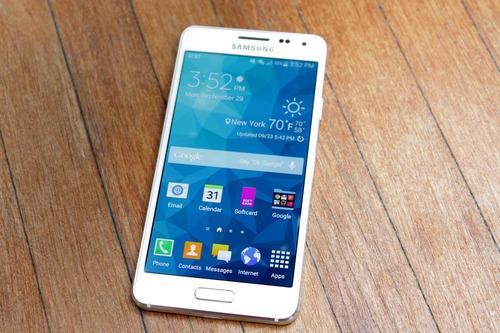
Samsung’s Galaxy S5 is one of the most advanced smartphones in the world. But its plastic body and relatively bland design fall far short of the elegant stylings of Apple’s iPhone and HTC’s One M8.
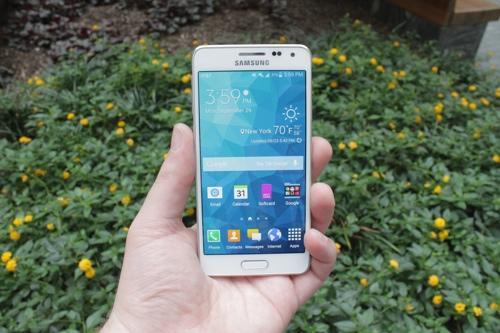
That’s where the new Galaxy Alpha comes in. The first genuinely attractive smartphone to come from Samsung, the Alpha seeks to put to rest all of those criticisms about the Korean tech giant’s inability to create a handset that’s aesthetically appealing as well as technically advanced.
Available exclusively through AT&T for $199 with a two-year contract, the 4.7-inch Galaxy Alpha packs many of the same features as the 5-inch Galaxy S5 in a smaller, more fashionable body. So should you make it your own? Let’s check it out.
Good looks at a cost
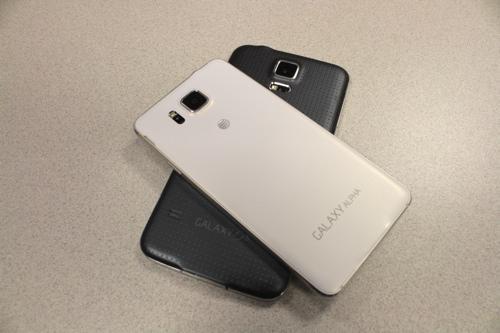
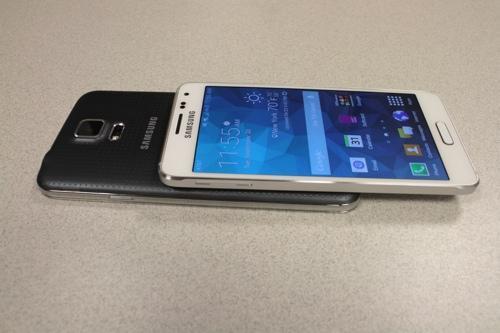
The Galaxy Alpha is hands-down the best-looking phone Samsung has ever made. That’s thanks in large part to its slim design and metal frame. Sure, the front and back of the Alpha are still plastic, but the metal framing goes a long way toward making the phone more attractive.
It certainly looks better and feels sturdier than the all-plastic Galaxy S5. What’s more, the Alpha, like the iPhone and One M8, has polished, chamfered edges. Hold it right, and it glimmers in the midday sun.
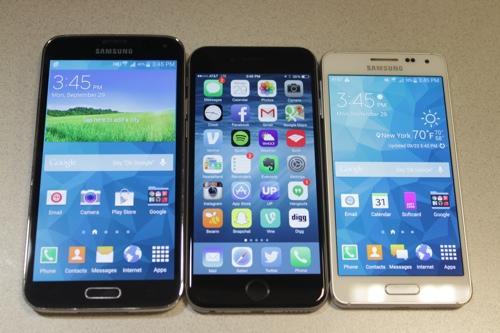
Now, to say that the Alpha shares a passing resemblance to the iPhone 5s is an understatement. More than a few people who checked out my Galaxy Alpha review unit quipped that it looked exactly like an iPhone 5.
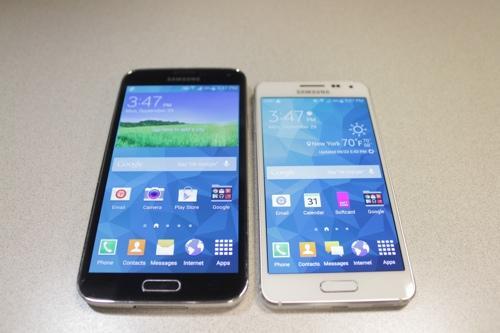
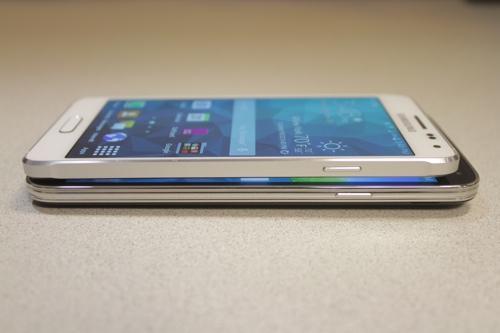
Standing at 5.2 inches tall and 0.26 inches thick, the Galaxy Alpha is both shorter and thinner than its stablemate, the Galaxy S5. Like thenew iPhone 6, the Alpha features a 4.7-inch display, but the Apple phone is noticeably taller than the Samsung. It’s also a hair thicker than the Alpha and slightly heavier.
image

Daniel Howley/ Yahoo Tech)
To get the Alpha so thin and light, Samsung had to sacrifice a few of the features that made the Galaxy S5 so successful. Chief among them: the S5’s water resistance. So where the Galaxy S5 would happily take a dip in the pool and be no worse for wear, the Alpha would be begging for a life jacket.
Still, the smaller size (compared with the S5), means it’s easier to use the Alpha with one hand without worrying about dropping it, like I do with the Galaxy S5.
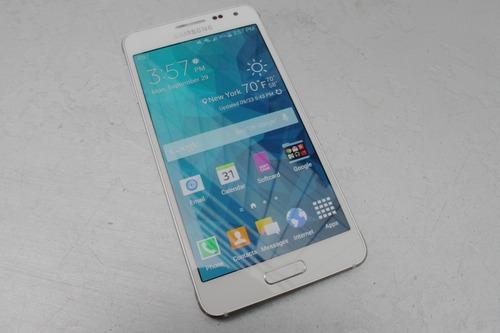
Screen and soundUnlike the Galaxy S5, which rocks a 5-inch, 1920 × 1080 pixel resolution display, Samsung’s Galaxy Alpha comes with a smaller 4.7-inch 1280 × 720 screen. Yet despite that, the Alpha’s display is just as gorgeous as its big brother’s. 
image
(Daniel Howley/ Yahoo Tech)
That’s because both phones use Samsung’s super active-matrix organic light-emitting diode, or Super AMOLED, display technology. Super AMOLED is known for offering deeper blacks than competing screen technologies, not to mention better battery life.
As with the Galaxy S5, the Galaxy Alpha’s display produces vibrant colors and deep blacks. Colors looked a bit truer on the iPhone 6, though. For example, a scene from The Hunger Games: Mockingjay trailer that took place in a dark corridor was difficult to make out on the Galaxy Alpha but was easily visible on the iPhone 6.
Despite that, I’m still a huge fan of Samsung’s colorful displays, and the Galaxy Alpha’s is no different.
image
(Daniel Howley/ Yahoo Tech)
If you’re looking for a smartphone with powerful external speakers, then you’re going to want to pass on the Galaxy Alpha. Sure, it can pump out volume, but it’s not as accurate as what you’d hear on something like the HTC One M8, which offers the best sound of any smartphone.
The more things change …The Galaxy Alpha might look nothing like the Galaxy S5 on the outside, but power on the phone and the similarities are obvious. That’s because both handsets come loaded with Google’s Android KitKat operating system, topped off with Samsung’s TouchWiz interface.
image
(Daniel Howley/ Yahoo Tech)
That means the phones can run all the same apps and offer the same functionality. For example, like the S5, the Alpha features Samsung’s Multi Window mode, which lets you view two apps onscreen at the same time.
There’s also Samsung’s Toolbox, a floating shortcut menu with five of your favorite apps that you can access from anywhere on your phone. Even the Alpha’s Settings menu is the same as the Galaxy S5’s.
Adding to the list of features the Alpha gets from its larger sibling are its fingerprint reader and heart-rate monitor. Like the Touch ID found on Apple’s iPhone, the Alpha’s fingerprint reader is built into its home button. But the Alpha’s reader isn’t nearly as reliable as Apple’s.
Often, I found myself having to swipe and re-swipe my finger across the Alpha’s reader several times before it recognized my print.
image
(Daniel Howley/ Yahoo Tech)
Like the Galaxy S5, the Alpha’s heart-rate monitor is located on the phone’s back panel next to its camera. But unlike the Galaxy S5’s heart-rate monitor, which was inconsistent in its ability to read your pulse, the Alpha was easily able to provide me with my heart rate time and time again.
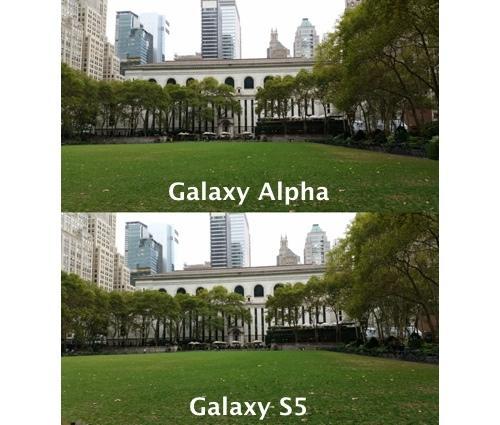
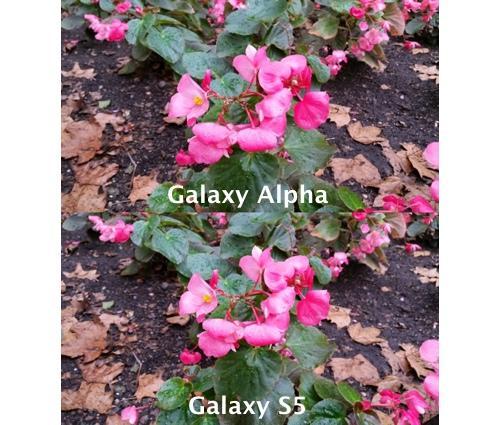
CameraPhotos taken with Galaxy Alpha’s 12-megapixel rear camera look nearly identical to those taken with the 16-megapixel camera on the Galaxy S5. Sure, the Galaxy S5’s photos are larger than the Alpha’s, but when it comes to overall image quality, the cameras are even.
image
(Daniel Howley/ Yahoo Tech)
A photo taken with the Alpha of a large field revealed that the handset’s camera, like the Galaxy S5’s, puts a greater emphasis on blues and greens. As a result, the field, which was soaked from rain, looked bright green. A picture of the same scene taken with the iPhone 6’s 8-megapixel iSight camera produced far subtler, more accurate colors.
image
(Daniel Howley/ Yahoo Tech)
Conversely, a shot taken of a flower with the Galaxy Alpha looked a bit washed out in certain areas. The iPhone’s photo, which was taken at the same time and angle, offered cooler colors.
image
(Daniel Howley/ Yahoo Tech)
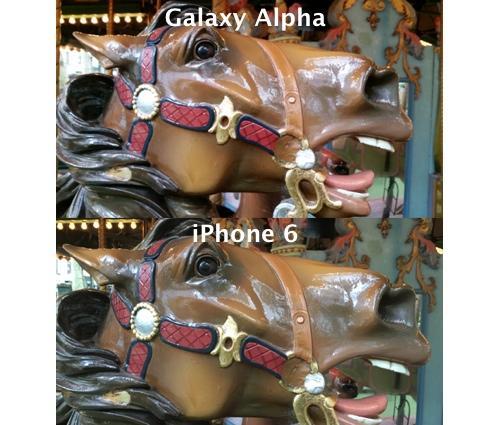
Overall, the Galaxy Alpha’s camera produced quality images, though they couldn’t quite compare to the iPhone 6’s photos. And before you get in a tizzy about the iPhone 6’s camera having a lower megapixel count than the Alpha or S5, remember this: A greater number of megapixels does not a good camera make.
Performance and batteryThe Galaxy Alpha packs a quad-core processor and 2 GB of RAM, which means it’ll easily handle almost anything you can throw at it. High-end games, however, will suffer a bit. Basic things like Candy Crush and its lot will run without a problem.
The one issue that Samsung fans might have with the Alpha is the fact that it doesn’t come with a microSD card slot. That means you can’t add any additional storage space beyond what the phone already comes with.
image
(Daniel Howley/ Yahoo Tech)
To make up for that, Samsung included 32 GB of storage with the Alpha. For most folks, that should be more than enough space. Still, the ability to add your own microSD card is something a lot of Samsung fans appreciate.
A smaller smartphone means a smaller battery, and that’s certainly the case with the Galaxy Alpha. Samsung has equipped this slim handset with a 1,860 mAh battery. That’s much smaller than the 2,800 mAh power plant found in the Galaxy S5.
Overall, the Alpha managed to get through the day with battery life to spare, as long as I wasn’t using it much. If you spend the day browsing the Web with the display brightness set too high, though, and you’ll sap the phone of juice relatively quickly.
Should you get one?
The Galaxy Alpha is Samsung’s best-looking smartphone to date. It’s incredibly thin and light, despite offering the same size screen as the iPhone 6, and its display is gorgeous. On the other hand, it lacks the Galaxy S5’s water resistance and expandable memory. The Alpha’s battery also won’t last nearly as long as the S5’s.
image
(Daniel Howley/ Yahoo Tech)
And then there’s the price. At $199, you’re paying for a phone that costs the same as the flagship Galaxy S5 or iPhone 6, without getting the same top-of-the-line specs like a 1080p screen and all-day battery life. That’s a letdown.
If you’re a Samsung fan who wants a small, stylish smartphone, you’ll definitely want to check out the Galaxy Alpha. But if you want something with a long-lasting battery and expandable memory, I’d recommend the Galaxy S5.
Email Daniel at dhowley@yahoo-inc.com; follow him on Twitter at @DanielHowley or on Google+ here. 
Credit:https://www.yahoo.com/tech/samsungs-galaxy-s5-is-one-of-the-most-advanced-98824931784.html